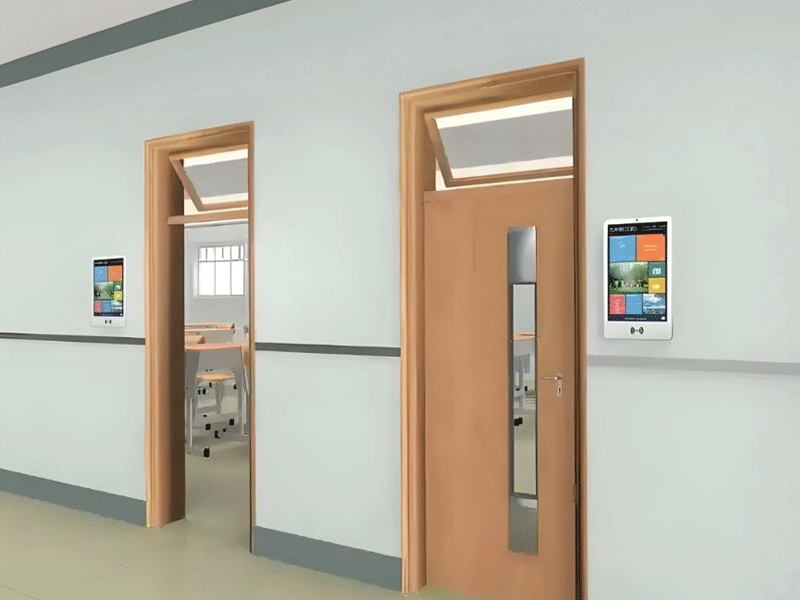


Kinokontrol ng digital nameplate app ang wireless electronic display table class sign e-lnk name card screen
Electronic class sign-9
$350
Tampok: mga monitor na katugma sa macbook pro; aoc portable monitor; transparent na monitor; ultra wide screen monitor
Sukat: 10.1'';13.3'';15.6'';19'';21.5'';27'';32'';50'';55'';18.5'';24'';43'';49'';20cmx20cm;25cmx25cm
Sistema ng Operasyon: Android; bintana
Screen: Touchscreen; Non-touch na screen
Pag-install: Patayong; Pahalang; Naka-mount sa dingding; Portable
Uri: Advertising Machine; Display ng Digital Signage; Pagtuturo ng All-in-one na Machine
Product Details
Product Details
Ang Diverse User Demographics ng Electronic Classboards: A ComprehensiveOverviewIntroduction: Beyond ClassroomBoundariesElectronic classboards ay umunlad mula sa mga pagpapakita lamang ng impormasyon hanggang sa mga dynamic na hub ng komunikasyon, na tumutugon sa isang multifaceted user ecosystem. Ang kanilang kakayahang umangkop ay nagmumula sa modular na disenyo at nako-customize na mga tampok, na ginagawa itong kailangang-kailangan para sa mga institusyong K-12, mas mataas na edukasyon, edukasyon sa mga espesyal na pangangailangan, at maging sa mga kapaligiran ng pagsasanay sa korporasyon. Nasa ibaba ang isang malalim na pagsusuri ng kanilang mga pangunahing pangkat ng gumagamit at mga iniangkop na pag-andar.1. K-12 Students: Pag-navigate sa Academic Schedules na may ClarityAge-Specific NeedsElementary Schoolers (6-12 years old): Mangangailangan ng visual-centric interface (mga makukulay na icon, animated na timetable) para maunawaan ang mga iskedyul. Ang mga electronic classboard na may 19201080 na resolution ay nagpapakita ng edad- naaangkop na nilalaman tulad ng mga listahan ng pagbabasa o mga deadline ng art project sa malaki, nababasang mga font.Middle & High School Students (13-18 taong gulang): Kailangan ng real-time na update sa mga pagsusulit, club meeting, at mga deadline ng aplikasyon sa kolehiyo. Ang pag-andar ng touchscreen ay nagbibigay-daan sa self-service na access sa mga mapagkukunan (hal., pag-scan ng QR code para sa mga file ng takdang-aralin). Impact Case StudyIsang pag-aaral sa Toronto Public Schools ay nagpakita na 78% ng mga estudyante sa middle school ay nabawasan ang
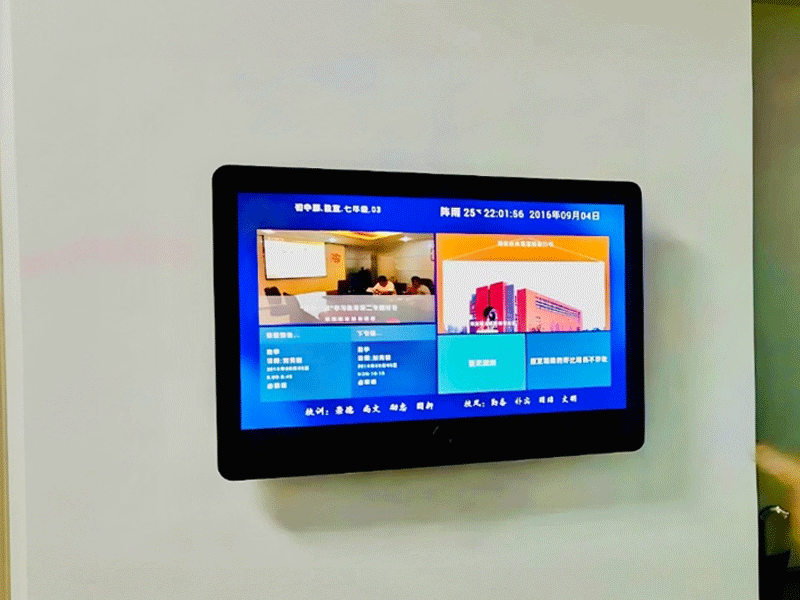
2. Educators: Mula sa Lesson Planning hanggang Classroom Management
Multi-Role Functionality
Mga Guro at Propesor:
Pag-iiskedyul ng malayuang nilalaman (hal., paunang pag-load ng mga tagubilin sa eksperimento sa agham sa susunod na linggo).
Pagsasama sa Learning Management Systems (LMS) tulad ng Canvas o Blackboard upang ipakita ang mga paparating na takdang-aralin.
Mga Guro sa Administratibo:
Pag-uugnay ng mga kaganapan sa buong paaralan (mga araw ng palakasan, mga kumperensya ng magulang at guro) sa pamamagitan ng sentralisadong pamamahala ng nilalaman.
Paggamit ng built-in na analytics upang subaybayan kung gaano kadalas nakikipag-ugnayan ang mga mag-aaral sa impormasyon ng classboard.
Mga Teknikal na Tool para sa mga Edukador
User-Friendly CMS (Sistema ng Pamamahala ng Nilalaman):
Ang mga drag-and-drop na interface ay nagbibigay-daan sa mga guro na may kaunting tech na kasanayan na mag-upload ng mga PDF, video, o slideshow.
Pag-sync ng Multi-device:
I-update ang nilalaman ng classboard mula sa isang laptop, tablet, o smartphone, perpekto para sa mga tagapagturo habang naglalakbay.
3. Mga Administrator ng Paaralan: Orchestrating Institutional Communication
Koordinasyon sa Malawak na Campus
Staff sa Front Office:
Pagpapadala ng mga alertong pang-emergency (mga pamamaraan ng pag-lock, mga babala sa panahon) sa lahat ng mga classboard nang sabay-sabay.
Pagpapakita ng mga tagubilin sa pagpaparehistro ng bisita at mga mapa ng campus para sa mga inaasahang pamilya.
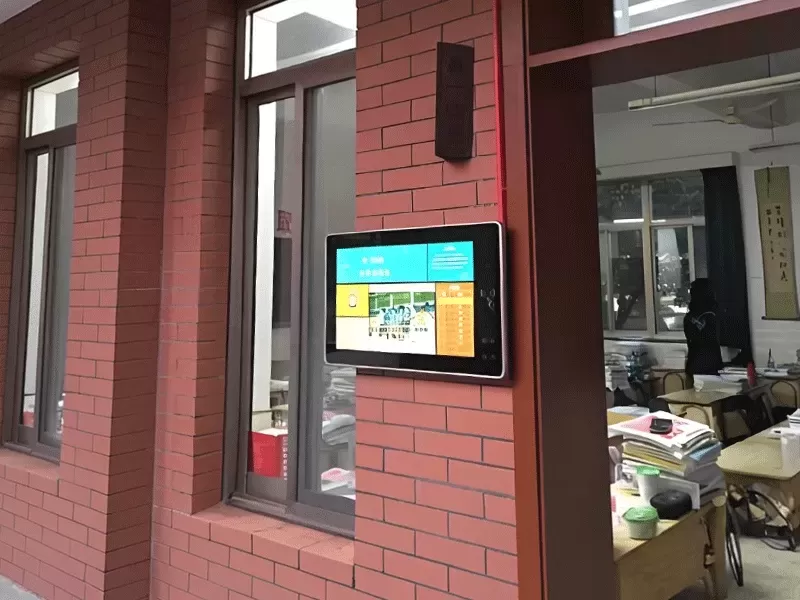
Mga Tagapamahala ng IT at Pasilidad:
Pagsubaybay sa kalusugan ng classboard (katayuan ng baterya, mga update sa software) sa 50 + na device.
Pag-configure ng mga hierarchy ng nilalaman (hal., ang mga anunsyo ng punong-guro ay nag-o-override sa mga update sa antas ng silid-aralan).
Mga Halimbawa ng System Integration
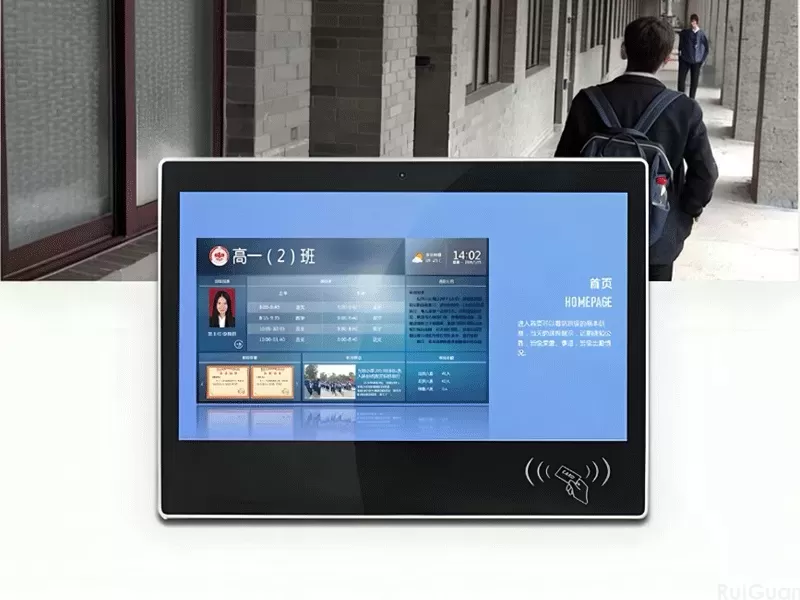
Pagsasama sa mga sistema ng ID card ng mag-aaral: Ang pag-swipe ng ID card ay nagpapakita ng mga personalized na iskedyul para sa mga mag-aaral sa boarding school.
Koneksyon sa mga security camera para sa real-time na mga update sa kaligtasan sa panahon ng mga kaganapan sa campus.
4. Mga Magulang at Tagapangalaga: Pagtulay sa Komunikasyon sa Tahanan-Paaralan
Pakikipag-ugnayan sa kabila ng Silid-aralan
Drop-off / Pick-up na Komunikasyon:
Pagpapakita ng mga pang-araw-araw na paalala (hal., "Magdala ng mga damit sa gym bukas") o mga menu ng tanghalian para sa mga magulang sa elementarya.
Akademikong Transparency:
Mga secure na portal (na-access sa pamamagitan ng mga QR code) na nagpapakita ng mga talaan ng pagdalo ng mag-aaral o paparating na mga puwang ng pagpupulong ng magulang at guro.
Mga Pagbagay sa Kultura
Mga opsyon sa pagpapakita ng bilingual (hal., English-Spanish sa magkakaibang komunidad) upang matiyak na mananatiling may kaalaman ang mga magulang na hindi nagsasalita ng Ingles.
Mga feature ng accessibility tulad ng text-to-speech para sa mga magulang na may kapansanan sa paningin.
5. Mga Gumagamit ng Mas Mataas na Edukasyon: Pagtutustos sa Mga Espesyal na Pangangailangan sa Akademiko
Mga Aplikasyon sa Unibersidad at Kolehiyo
Mga Mag-aaral sa Undergraduate:
Pagpapakita ng mga pagbabago sa lecture hall, pag-sign up sa seminar ng pananaliksik, at mga update sa mapagkukunan ng library.
Mga interactive na mapa na nagpapakita ng mga lokasyon ng silid ng pagsusulit sa linggo ng finals.
Mga Nagtapos na Mag-aaral at Mananaliksik:
Pag-post ng mga iskedyul ng availability ng lab, mga sistema ng pagpapareserba ng kagamitan, o mga deadline ng pagsusumite ng kumperensya.
Mga Propesor sa STEM Fields:
Paggamit ng mga classboard bilang mga digital whiteboard na isinama sa mga tool sa visualization ng data (hal., pagpapakita ng mga real-time na resulta ng eksperimento).
6. Mga Gumagamit ng Espesyal na Edukasyon: Inklusibong Disenyo sa Edukasyon
Mga Tampok ng Accessibility
Mga Tampok ng Accessibility
Suporta sa Visual Impairment:
High-contrast mode (1000: 1 ratio) at mga screen reader na naririnig na naglalarawan ng ipinapakitang content.
Mga tactile overlay para sa mga touchscreen, na nagpapahintulot sa mga bulag na estudyante na mag-navigate sa mga menu sa pamamagitan ng mga nakataas na marker.
Mga Mag-aaral na Neurodivergent:
Pagpapakalma ng mga scheme ng kulay at pinasimpleng mga layout upang mabawasan ang labis na karga ng pandama.
Naka-iskedyul na mga visual timer para sa mga mag-aaral na may ADHD, na nagpapakita ng natitirang oras ng klase sa isang hindi mapanghimasok na paraan.
Pag-aaral ng Kaso: Paaralan ng Espesyal na Edukasyon sa Melbourne
Pagkatapos ipatupad ang mga electronic classboard na may mga adaptive na feature:
83% ng mga guro ang nag-ulat ng pinabuting pakikipag-ugnayan ng mag-aaral sa panahon ng mga pagbabago sa iskedyul.
Gumamit ang mga non-verbal na estudyante ng mga touchscreen na communication board upang ipahayag ang mga pangangailangan, na binabawasan ang mga insidente ng pag-uugali ng 45%.
7. Mga Bisita at Miyembro ng Komunidad: Campus bilang Public Hub
Outreach at Accessibility
Mga Prospective na Mag-aaral at Magulang:
Maa-access ang mga interactive na campus tour sa pamamagitan ng mga classboard sa tanggapan ng admisyon.
Pagpapakita ng mga ranggo ng paaralan, mga kwento ng tagumpay ng alumni, at mga paparating na petsa ng open house.
Mga Dumalo sa Kaganapan sa Komunidad:
Pagpapakita ng mga direksyon sa mga auditorium, mga mapa ng paradahan, o mga iskedyul ng kaganapan sa panahon ng mga pampublikong lektura o mga laban sa palakasan.
8. Pagsasanay sa Korporasyon at Edukasyong Bokasyonal
Mga Aplikasyon sa Propesyonal na Pagpapaunlad
Mga Corporate Training Room:
Pagpapakita ng mga agenda ng workshop, QR code para sa mga digital na handout, o real-time na mga resulta ng botohan.
Mga Paaralang Bokasyonal:
Pagpapakita ng mga protocol sa kaligtasan ng pagpapatakbo ng makina sa mga teknikal na lab o mga update sa paglalagay ng trabaho para sa mga estudyanteng nakatuon sa karera.
Konklusyon: Isang User-Centric Educational Ecosystem
Ang mga electronic classboard ay umuunlad sa kanilang kakayahang kumilos bilang isang unibersal na tool sa komunikasyon, na umaangkop sa mga nuanced na pangangailangan ng bawat stakeholder - mula sa mga 6 na taong gulang na nagna-navigate sa kanilang unang iskedyul ng paaralan hanggang sa mga mananaliksik sa unibersidad na nag-uugnay ng mga kumplikadong proyekto. Ang kanilang tunay na halaga ay hindi nakasalalay sa static na pagpapakita ng impormasyon ngunit sa pagpapaunlad ng isang collaborative na kapaligiran kung saan ang mga mag-aaral, tagapagturo, at mga magulang ay maaaring makipag-ugnayan sa akademikong nilalaman sa paraang personalized, naa-access, at mahusay. Habang patuloy na tinatanggap ng edukasyon ang digital transformation, lalago lamang ang papel ng mga classboard sa pag-iisa ng magkakaibang grupo ng gumagamit, na nagpapatibay sa kanilang katayuan bilang kailangang-kailangan na teknolohiyang pang-
Related Products